Managing storage efficiencies
By enabling storage efficiencies on your FSx for ONTAP volumes, you can optimize storage utilization, reduce storage costs, and improve your file system's performance overall.
Note
We recommend enabling storage efficiencies using the Amazon FSx console, API, or AWS CLI to ensure that the optimal storage efficiency settings are applied to your volumes.
ONTAP organizes files into 4 kibibyte (KiB) data blocks. Storage efficiencies take place at the data block level rather than at the level of individual files. When storage efficiencies are enabled, ONTAP employs a combination of data reduction techniques to eliminate duplicate data, compress the size of data, and reorganize the layout of data for optimal disk usage.
Storage efficiencies are applied in two ways. They are applied to data inline (before data is written to disk, in memory) to provide immediate storage savings. They are also applied to data in the background (after the data is written to disk) in the SSD storage tier through periodic efficiency jobs to optimize storage utilization over time. Background storage efficiencies don't run on data after it's tiered to the capacity pool. However, if the data had any storage savings while it was in SSD, these savings are preserved when the data is tiered to the capacity pool.
Note
ONTAP doesn't support enabling storage efficiencies on data protection (DP) volumes. However, storage savings achieved in the source read-writable (RW) volume are preserved when data is replicated to the destination DP volume.
Compression of data blocks
Compression groups are logical groupings of data that are managed and compressed together as a single block. ONTAP automatically packs data blocks into compression groups, which reduces the space consumed on disk. To optimize performance and storage utilization, ONTAP provides a balanced approach to managing data by adjusting the degree of compression that's applied to the data based on its access patterns.
By default, data is compressed inline using 8 KB compression groups to ensure optimal performance when writing data to a volume. Optionally, you can apply heavier compression
to data by enabling inactive data compression on a volume to further compress data in SSD. Inactive data compression uses 32 KB compression groups on cold data for additional storage savings. For more information,
see the volume efficiency inactive-data-compression modify
Note
Inactive data compression consumes additional CPU and disk IOPS and can be a resource-intensive task. We recommend that you evaluate the performance impact of running inactive data compression on your workload before enabling this feature.
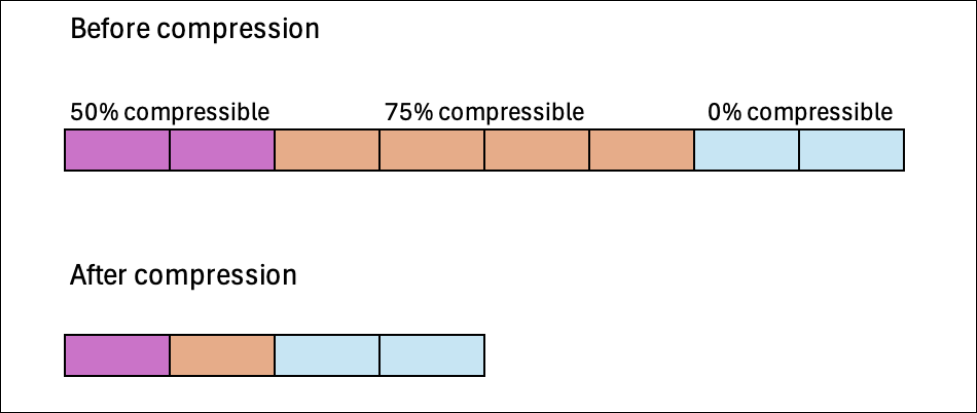
The following image illustrates the storage savings that can be achieved by compressing data blocks.
Deduplication of data blocks
ONTAP detects and eliminates duplicate data blocks to reduce redundancies in data. The duplicate blocks are replaced with references to shared unique blocks.
By default, data is deduplicated inline to reduce the storage footprint before data is written to disk. ONTAP also runs a background deduplication scanner at specified intervals to identify and eliminate duplicate data after it's been written to disk. During these scheduled scans, ONTAP processes a change log to identify new or modified data blocks since the last scan that haven't been deduplicated yet. When duplicates are found, ONTAP updates the metadata to point to a single copy of the duplicated blocks and marks the redundant blocks as free space that's ready to be reclaimed.
Note
ONTAP applies deduplication to 4 KB of incoming writes at a time, so you might see lower deduplication savings when running workloads with writes that are smaller than 4 KB in size.
FSx for ONTAP doesn't support cross-volume deduplication.
The following image illustrates the storage savings that can be achieved with deduplication.

Compaction of data blocks
ONTAP consolidates partially filled data blocks that are less than 4 KB each into a more efficiently utilized 4 KB block.
By default, data is compacted inline to optimize the layout of data as it's written to disk to minimize storage overhead, reduce fragmentation, and improve read performance.
The following image illustrates the storage savings that can be achieved with compaction.

Example: storage efficiencies
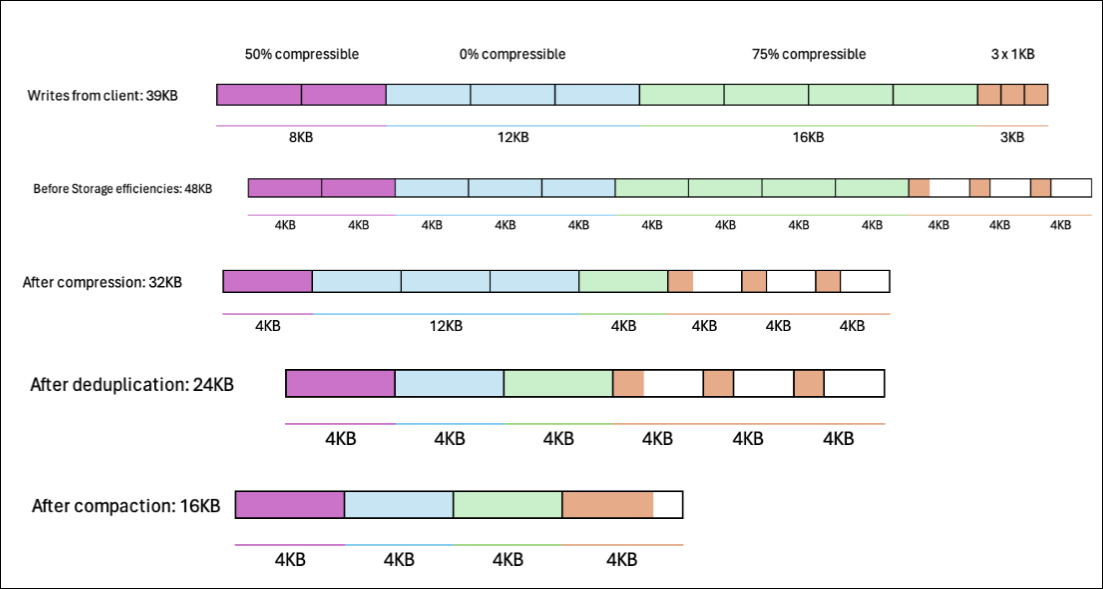
The following image illustrates how storage efficiencies are applied to data.
Storage Efficiency status
Amazon FSx reports a volume's storage efficiency as Enabled in the console, API, and AWS CLI only when the volume's storage efficiency configuration in ONTAP matches the settings that Amazon FSx uses. When you enable storage efficiency on a volume, Amazon FSx applies the following ONTAP settings:
Compression: inline
Deduplication: inline and background (both)
Cross-volume deduplication: none
Compaction: inline
If you modify storage efficiency settings with the ONTAP CLI or REST API, or if you migrated your volumes from an on-premises ONTAP system, the volume's configuration might not match these settings. When that happens, Amazon FSx reports storage efficiency as Disabled, even if efficiency features are still active on the volume.
To restore the Amazon FSx-managed configuration and have the console report Enabled, use one of the following methods:
AWS CLI:
aws fsx update-volume --volume-idvol-id--ontap-configuration StorageEfficiencyEnabled=trueONTAP CLI:
::>volume efficiency on -vserversvm-name-volumevol-name::>volume efficiency modify -vserversvm-name-volumevol-name-inline-dedupe true -inline-compression true -data-compaction true -compression true
Important
For volumes migrated from Cloud Volumes ONTAP with a compression type of secondary,
switching to the Amazon FSx-managed settings requires first undoing existing compression savings on the volume,
then re-enabling compression with the adaptive compression type. This operation is resource-intensive.
Plan this operation carefully before running it on production volumes. For more information, see
Moving
between secondary compression and adaptive compression
