翻訳は機械翻訳により提供されています。提供された翻訳内容と英語版の間で齟齬、不一致または矛盾がある場合、英語版が優先します。
# Amazon EC2 でのテスト設定
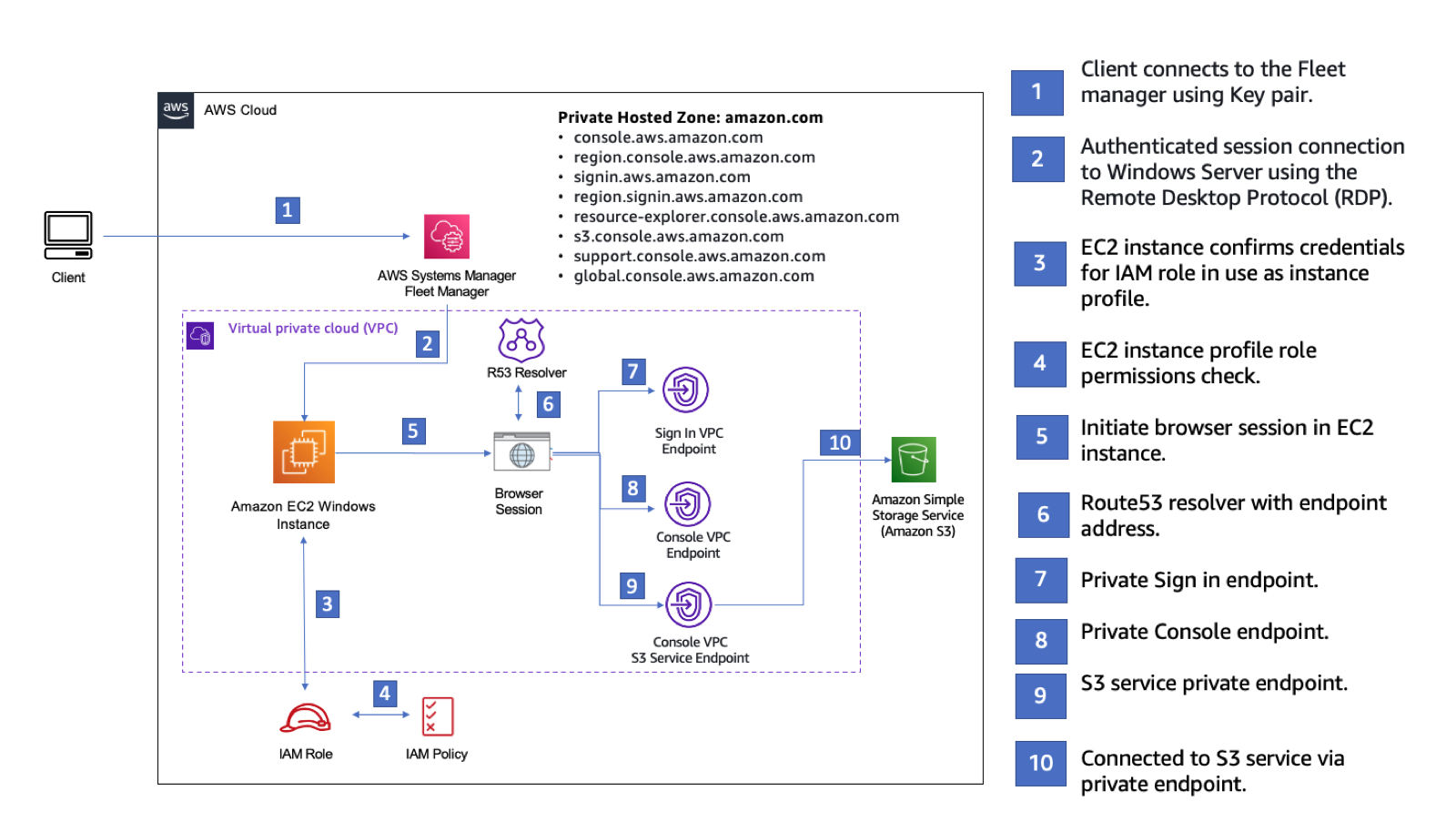
この設定は、Amazon EC2 インスタンスから Amazon Simple Storage Service AWS マネジメントコンソールへのプライベートアクセス接続を示しています。この例では、 CloudFormationを使用してネットワーク設定を作成し、リモートデスクトッププロトコル (RDP) を使用して Fleet Manager ( の一機能AWS Systems Manager) を介して Amazon EC2 Windows インスタンスに接続します。
次の図は、Amazon EC2 を使用して AWS マネジメントコンソールのプライベートアクセス設定にアクセスするためのワークフローを示しています。これは、ユーザーがプライベートエンドポイントを使用して Amazon S3 に接続する方法を示しています。
次のCloudFormationテンプレートをコピーし、*「ネットワークをセットアップ*するには」のステップ 3 で使用するファイルに保存します。
## AWS マネジメントコンソールプライベートアクセス環境 Amazon EC2CloudFormationtemplate
```
Description: |
AWS Management Console Private Access.
Parameters:
VpcCIDR:
Type: String
Default: 172.16.0.0/16
Description: CIDR range for VPC
PrivateSubnet1CIDR:
Type: String
Default: 172.16.1.0/24
Description: CIDR range for Private Subnet 1
PrivateSubnet2CIDR:
Type: String
Default: 172.16.2.0/24
Description: CIDR range for Private Subnet 2
Ec2KeyPair:
Type: AWS::EC2::KeyPair::KeyName
Description: The EC2 KeyPair to use to connect to the Windows instance
LatestWindowsAmiId:
Type: AWS::SSM::Parameter::Value
Default: /aws/service/ami-windows-latest/Windows_Server-2022-English-Full-Base
InstanceTypeParameter:
Type: String
Default: m5.large
Resources:
#########################
# VPC AND SUBNETS
#########################
AppVPC:
Type: AWS::EC2::VPC
Properties:
CidrBlock: !Ref VpcCIDR
InstanceTenancy: default
EnableDnsSupport: true
EnableDnsHostnames: true
PrivateSubnet1:
Type: AWS::EC2::Subnet
Properties:
VpcId: !Ref AppVPC
CidrBlock: !Ref PrivateSubnet1CIDR
AvailabilityZone:
Fn::Select:
- 0
- Fn::GetAZs: ""
PrivateSubnet2:
Type: AWS::EC2::Subnet
Properties:
VpcId: !Ref AppVPC
CidrBlock: !Ref PrivateSubnet2CIDR
AvailabilityZone:
Fn::Select:
- 1
- Fn::GetAZs: ""
#########################
# Route Tables
#########################
PrivateRouteTable:
Type: AWS::EC2::RouteTable
Properties:
VpcId: !Ref AppVPC
PrivateSubnet1RouteTableAssociation:
Type: AWS::EC2::SubnetRouteTableAssociation
Properties:
RouteTableId: !Ref PrivateRouteTable
SubnetId: !Ref PrivateSubnet1
PrivateSubnet2RouteTableAssociation:
Type: AWS::EC2::SubnetRouteTableAssociation
Properties:
RouteTableId: !Ref PrivateRouteTable
SubnetId: !Ref PrivateSubnet2
#########################
# SECURITY GROUPS
#########################
VPCEndpointSecurityGroup:
Type: AWS::EC2::SecurityGroup
Properties:
GroupDescription: Allow TLS for VPC Endpoint
VpcId: !Ref AppVPC
SecurityGroupIngress:
- IpProtocol: tcp
FromPort: 443
ToPort: 443
CidrIp: !GetAtt AppVPC.CidrBlock
EC2SecurityGroup:
Type: AWS::EC2::SecurityGroup
Properties:
GroupDescription: Default EC2 Instance SG
VpcId: !Ref AppVPC
SecurityGroupIngress:
- IpProtocol: tcp
FromPort: 3389
ToPort: 3389
CidrIp: !Ref VpcCIDR
#########################
# VPC ENDPOINTS
#########################
VPCEndpointInterfaceSsm:
Type: AWS::EC2::VPCEndpoint
Properties:
VpcEndpointType: Interface
PrivateDnsEnabled: true
SubnetIds:
- !Ref PrivateSubnet1
- !Ref PrivateSubnet2
SecurityGroupIds:
- !Ref VPCEndpointSecurityGroup
ServiceName: !Sub com.amazonaws.${AWS::Region}.ssm
VpcId: !Ref AppVPC
PolicyDocument:
Version: 2012-10-17
Statement:
- Effect: Allow
Principal: '*'
Action: '*'
Resource: '*'
Condition:
StringEquals:
aws:PrincipalAccount: !Ref AWS::AccountId
aws:ResourceAccount: !Ref AWS::AccountId
aws:SourceVpc: !Ref AppVPC
- Effect: Deny
Principal: '*'
Action: '*'
Resource: '*'
Condition:
StringNotEquals:
aws:PrincipalAccount: !Ref AWS::AccountId
aws:ResourceAccount: !Ref AWS::AccountId
aws:SourceVpc: !Ref AppVPC
VPCEndpointInterfaceEc2Messages:
Type: AWS::EC2::VPCEndpoint
Properties:
VpcEndpointType: Interface
PrivateDnsEnabled: true
SubnetIds:
- !Ref PrivateSubnet1
- !Ref PrivateSubnet2
SecurityGroupIds:
- !Ref VPCEndpointSecurityGroup
ServiceName: !Sub com.amazonaws.${AWS::Region}.ec2messages
VpcId: !Ref AppVPC
PolicyDocument:
Version: 2012-10-17
Statement:
- Effect: Allow
Principal: '*'
Action: '*'
Resource: '*'
Condition:
StringEquals:
aws:PrincipalAccount: !Ref AWS::AccountId
aws:ResourceAccount: !Ref AWS::AccountId
aws:SourceVpc: !Ref AppVPC
- Effect: Deny
Principal: '*'
Action: '*'
Resource: '*'
Condition:
StringNotEquals:
aws:PrincipalAccount: !Ref AWS::AccountId
aws:ResourceAccount: !Ref AWS::AccountId
aws:SourceVpc: !Ref AppVPC
VPCEndpointInterfaceSsmMessages:
Type: AWS::EC2::VPCEndpoint
Properties:
VpcEndpointType: Interface
PrivateDnsEnabled: true
SubnetIds:
- !Ref PrivateSubnet1
- !Ref PrivateSubnet2
SecurityGroupIds:
- !Ref VPCEndpointSecurityGroup
ServiceName: !Sub com.amazonaws.${AWS::Region}.ssmmessages
VpcId: !Ref AppVPC
PolicyDocument:
Version: 2012-10-17
Statement:
- Effect: Allow
Principal: '*'
Action: '*'
Resource: '*'
Condition:
StringEquals:
aws:PrincipalAccount: !Ref AWS::AccountId
aws:ResourceAccount: !Ref AWS::AccountId
aws:SourceVpc: !Ref AppVPC
- Effect: Deny
Principal: '*'
Action: '*'
Resource: '*'
Condition:
StringNotEquals:
aws:PrincipalAccount: !Ref AWS::AccountId
aws:ResourceAccount: !Ref AWS::AccountId
aws:SourceVpc: !Ref AppVPC
VPCEndpointInterfaceSignin:
Type: AWS::EC2::VPCEndpoint
Properties:
VpcEndpointType: Interface
PrivateDnsEnabled: true
SubnetIds:
- !Ref PrivateSubnet1
- !Ref PrivateSubnet2
SecurityGroupIds:
- !Ref VPCEndpointSecurityGroup
ServiceName: !Sub com.amazonaws.${AWS::Region}.signin
VpcId: !Ref AppVPC
PolicyDocument:
Version: 2012-10-17
Statement:
- Effect: Allow
Principal: '*'
Action: signin:Authenticate
Resource: '*'
Condition:
StringEquals:
aws:ResourceAccount: !Ref AWS::AccountId
- Effect: Allow
Principal: '*'
Action:
- signin:AuthorizeOAuth2Access
- signin:CreateOAuth2Token
Resource: '*'
Condition:
StringEquals:
aws:PrincipalAccount: !Ref AWS::AccountId
VPCEndpointInterfaceConsole:
Type: AWS::EC2::VPCEndpoint
Properties:
VpcEndpointType: Interface
PrivateDnsEnabled: true
SubnetIds:
- !Ref PrivateSubnet1
- !Ref PrivateSubnet2
SecurityGroupIds:
- !Ref VPCEndpointSecurityGroup
ServiceName: !Sub com.amazonaws.${AWS::Region}.console
VpcId: !Ref AppVPC
PolicyDocument:
Version: 2012-10-17
Statement:
- Effect: Allow
Principal: '*'
Action: '*'
Resource: '*'
Condition:
StringEquals:
aws:PrincipalAccount: !Ref AWS::AccountId
aws:ResourceAccount: !Ref AWS::AccountId
aws:SourceVpc: !Ref AppVPC
- Effect: Deny
Principal: '*'
Action: '*'
Resource: '*'
Condition:
StringNotEquals:
aws:PrincipalAccount: !Ref AWS::AccountId
aws:ResourceAccount: !Ref AWS::AccountId
aws:SourceVpc: !Ref AppVPC
VPCEndpointInterfaceConsoleStatic:
# console-static only supports the full access endpoint policy
Type: AWS::EC2::VPCEndpoint
Properties:
VpcEndpointType: Interface
PrivateDnsEnabled: true
SubnetIds:
- !Ref PrivateSubnet1
- !Ref PrivateSubnet2
SecurityGroupIds:
- !Ref VPCEndpointSecurityGroup
ServiceName: !Sub com.amazonaws.${AWS::Region}.console-static
VpcId: !Ref AppVPC
#########################
# EC2 INSTANCE
#########################
Ec2InstanceRole:
Type: AWS::IAM::Role
Properties:
AssumeRolePolicyDocument:
Version: 2012-10-17
Statement:
- Effect: Allow
Principal:
Service:
- ec2.amazonaws.com
Action:
- sts:AssumeRole
Path: /
ManagedPolicyArns:
- arn:aws:iam::aws:policy/AmazonSSMManagedInstanceCore
Ec2InstanceProfile:
Type: AWS::IAM::InstanceProfile
Properties:
Path: /
Roles:
- !Ref Ec2InstanceRole
Ec2LaunchTemplate:
Type: AWS::EC2::LaunchTemplate
Properties:
LaunchTemplateData:
MetadataOptions:
HttpTokens: required
EC2WinInstance:
Type: AWS::EC2::Instance
Properties:
ImageId: !Ref LatestWindowsAmiId
IamInstanceProfile: !Ref Ec2InstanceProfile
KeyName: !Ref Ec2KeyPair
InstanceType: !Ref InstanceTypeParameter
SubnetId: !Ref PrivateSubnet1
SecurityGroupIds:
- !Ref EC2SecurityGroup
BlockDeviceMappings:
- DeviceName: /dev/sda1
Ebs:
VolumeSize: 50
LaunchTemplate:
LaunchTemplateId: !Ref Ec2LaunchTemplate
Version: !GetAtt Ec2LaunchTemplate.LatestVersionNumber
Tags:
- Key: Name
Value: Console VPCE test instance
```
**ネットワークを設定するには**
1. 組織の管理アカウントにサインインして、[CloudFormation コンソール](https://console.aws.amazon.com/cloudformation)を開きます。
1. **[スタックの作成]** を選択してください。
1. **[With new resources (standard)]** (新しいリソースの使用 (標準)) を選択します。以前に作成したCloudFormationテンプレートファイルをアップロードし、**次へ**を選択します。
1. **PrivateConsoleNetworkForS3** などスタックの名前を入力し、**[次へ]** を選択します。
1. **VPC とサブネット**の場合、希望する IP CIDR 範囲を入力するか、指定されたデフォルト値を使用してください。デフォルト値を使用する場合は、 の既存の VPC リソースと重複していないことを確認しますAWS アカウント。
1. **EC2KeyPair** パラメータには、アカウント内の既存の Amazon EC2 キーペアから 1 つ選択します。既存の Amazon EC2 キーペアがない場合は、次のステップに進む前に作成する必要があります。詳細については、[「Amazon EC2 ユーザーガイド」](https://docs.aws.amazon.com/AWSEC2/latest/UserGuide/create-key-pairs.html#having-ec2-create-your-key-pair)の*「Amazon EC2 を使用したキーペアの作成」*を参照してください。
1. **[スタックの作成]** を選択してください。
1. スタックが作成されたら、**[リソース]** タブを選択して、作成されたリソースを表示します。
**Amazon EC2 インスタンスに接続するには**
1. 組織の管理アカウントにサインインして、[[Amazon EC2 コンソール]](https://console.aws.amazon.com/ec2) を開きます。
1. ナビゲーションペインで、[**インスタンス**] を選択してください。
1. **インスタンス**ページで、CloudFormationテンプレートによって作成された**コンソール VPCE テストインスタンス**を選択します。次に、**[接続]** を選択します。
**注記**
この例では、 の一機能である Fleet Manager AWS Systems Manager Explorerを使用して Windows Server に接続します。接続を開始するまでに数分かかることがあります。
1. **[インスタンスに接続]** ページで、**[RDP クライアント]**、**[Fleet Manager を使用して接続]** の順に選択します。
1. **[Fleet Manager リモートデスクトップ]** を選択します。
1. Amazon EC2 インスタンスの管理パスワードを取得し、ウェブインターフェイスを使用して Windows Desktop にアクセスするには、CloudFormationテンプレートの作成時に使用した Amazon EC2 キーペアに関連付けられたプライベートキーを使用します。
1. Amazon EC2 Windows インスタンスから、ブラウザAWS マネジメントコンソールで を開きます。
1. AWS認証情報を使用してサインインしたら、[Amazon S3 コンソール](https://console.aws.amazon.com/s3)を開き、プライベートアクセスを使用してAWS マネジメントコンソール接続されていることを確認します。
**AWS マネジメントコンソールプライベートアクセスのセットアップをテストするには**
1. 組織の管理アカウントにサインインして、[[Amazon S3 コンソール]](https://console.aws.amazon.com/s3) を開きます。
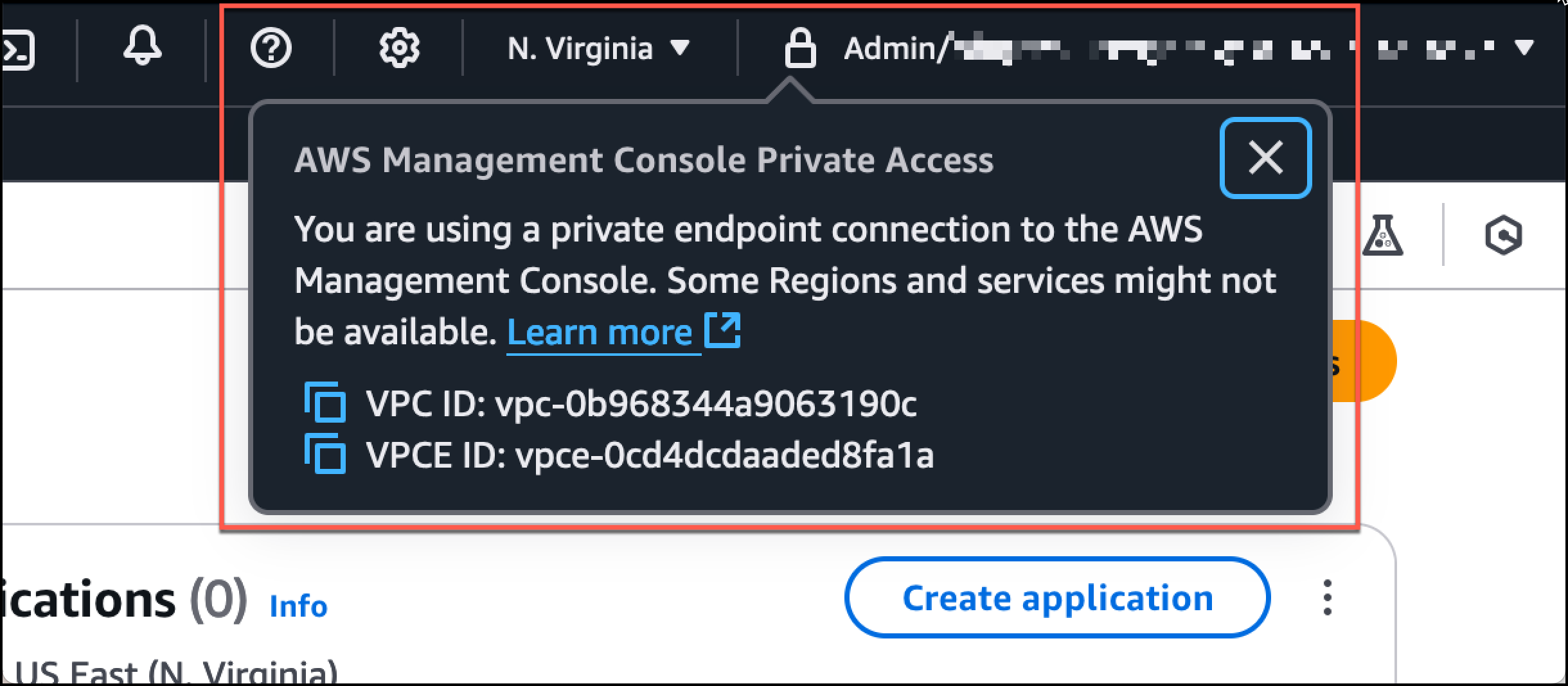
1. ナビゲーションバーのロックプライベートアイコンを選択すると、使用中の VPC エンドポイントが表示されます。次のスクリーンショットは、ロックプライベートアイコンの場所と VPC 情報を示しています。