NEW - You can now accelerate your migration and modernization with AWS Transform. Read Getting Started in the AWS Transform User Guide.
Network requirements for MGN
Before you use MGN, make sure to prepare your environments. Preparation includes setting correct network settings, defining network requirements, and opening the correct ports.
Topics
Service and network architecture overview
Watch the AWS Transform MGN -
Service architecture and network architecture video
This is the MGN network diagram:

Network setting preparations
As part of network setting preparations, set up a staging area and operational subnets.
Staging area subnet
Before setting up MGN you should create a subnet which will be used by the service as a staging area for data replicated from your source servers to AWS.
-
You must specify this subnet in the replication settings template. While you can use an existing subnet in your AWS account, the best practice is to create a new dedicated subnet for this purpose. Learn more about replication settings.
-
You can override this subnet for specific source servers in the replication settings.
Note
MGN does not require special configuration for AWS Local Zones. You specify a staging area subnet and a launch subnet. MGN uses whichever subnet you provide, regardless of whether it is in an Availability Zone or a Local Zone.
For optimal performance of replication servers and conversion servers, we recommend placing the staging area subnet in the parent AWS Region rather than the Local Zone. If your requirements dictate using a Local Zone subnet for the staging area, we recommend testing replication and cutover thoroughly before proceeding with production migrations.
Operational subnets
Test and cutover instances are launched in a subnet you specify in the Amazon EC2 launch template associated with each source server. The Amazon EC2 launch template is created automatically when you add a source server to AWS Transform MGN.
Learn more about launching test and cutover instances.
Learn more about how Amazon EC2 launch templates are used.
Active Directory connectivity
If your source servers are domain-joined to an Active Directory, ensure that the target VPC has network connectivity and DNS resolution to your AD domain controllers before launching test or cutover instances. During conversion, MGN resets network settings to use DHCP, which means instance-level DNS overrides from the source server are not preserved.
For details on configuring DNS and network connectivity for domain-joined servers, see Target instance cannot connect to Active Directory after migration.
Important
Isolate your test VPC from your production network. If you launch a domain controller into a test VPC that has a network route back to your on-premises or production environment, production clients might bind to the launched domain controller instead of your production Active Directory, which can disrupt production workloads. When testing, we recommend that you do not launch Active Directory domain controllers into an environment that has connectivity to production, and that you remove any routes between your test VPC and your production network.
Cutover is different. A cutover instance is intended to replace your production server, so connectivity to your existing environment is expected. When you cut over a domain controller, plan the timing carefully: coordinate the shutdown of the corresponding on-premises or source domain controller with the cutover so that clients transition to the migrated domain controller in a controlled way, rather than having two active domain controllers serve the same clients at once.
If you plan to operate in a hybrid configuration, where your on-premises environment remains online alongside servers migrated to the cloud, plan network connectivity between the two environments carefully. Ensure that clients resolve and connect to the intended Active Directory domain controllers so that you avoid unexpected results, such as clients binding to the wrong domain controller.
Required connectivity settings
To prepare your network for running AWS Transform MGN, configure the following connectivity settings. All communication is encrypted with TLS.
Important
SSL interception should not be applied for communication between replication servers and the MGN API endpoint, or between source servers and the MGN API endpoint.
Topics
Endpoints and firewall allowlist
Add the following endpoints and URLs to your firewall allowlist.
MGN API endpoints
| Protocol | Endpoint |
|---|---|
| IPv4 | https://mgn. |
| Dual-stack (IPv4/IPv6) | https://mgn. |
Replace region with the AWS Region code you are replicating
to (for example, us-east-1).
Amazon EC2 endpoint
The staging area subnet requires outbound access to the Amazon EC2 endpoint of its AWS Region.
Amazon S3 buckets
The AWS Replication Agent installer and the staging area subnet require access to Amazon S3. Allowlist these buckets:
https://aws-mgn-internal-<region>.s3.<region>.amazonaws.com/
https://aws-mgn-internal-hashes-<region>.s3.<region>.amazonaws.com/
https://aws-application-migration-service-<region>.s3.<region>.amazonaws.com/
https://aws-application-migration-service-hashes-<region>.s3.<region>.amazonaws.com/
https://amazon-ssm-<region>.s3.<region>.amazonaws.com/
https://al2023-repos-<region>-de612dc2.s3.dualstack.<region>.amazonaws.com/
Note
For IPv6/dual-stack environments, use the Amazon S3 dual-stack endpoint format:
https://<bucket>.s3.dualstack.<region>.amazonaws.com/. Learn more about
Amazon S3
dual-stack endpoints.
Important
Ensure that your Amazon S3 VPC gateway endpoint policy allows access to the Amazon
Linux 2023 package repository bucket (al2023-repos-<region>-de612dc2). This
bucket is accessed through the Amazon S3 dual-stack endpoint.
Amazon S3 VPC Endpoint policy
If you use an Amazon S3 VPC Endpoint, you must provide sufficient permissions for service functionality, as shown in this example policy for replicating to us-east-1:
Communication between source servers and AWS Transform MGN over TCP port 443
Each source server that is added to MGN must continuously communicate with the MGN API endpoint over TCP port 443.
The main operations performed through this route are:
-
Downloading and upgrading the AWS Replication Agent.
-
Connecting the source servers to the MGN console and displaying their replication status.
-
Monitoring the source servers for troubleshooting and resource consumption metrics (CPU, RAM).
-
Reporting source server-related events (for example, disk changes).
-
Transmitting source server information to the MGN console (hardware information, running services, installed applications and packages).
-
Preparing the source servers for test or cutover.
Communication between source servers and the staging area subnet over TCP port 1500
Each source server with an installed AWS Replication Agent continuously communicates with the replication servers in the staging area subnet over TCP port 1500. This port is used for the transfer of replicated data from the source servers to the staging area subnet.
The replicated data is encrypted and compressed when transferred over TCP port 1500. The data is encrypted on the source infrastructure before transfer and decrypted at the staging area subnet before being written to the volumes.
AWS Transform MGN uses TLS 1.2 end to end from the agent installed on the source server to the Replication Server. Each replication server gets assigned a specific TLS server certificate, which is distributed to the corresponding Agent and validated on the agent side.
Communication between the staging area subnet and AWS Transform MGN over TCP port 443
The replication servers in the staging area subnet must continuously communicate with MGN over TCP port 443. The main operations performed through this route are:
-
Downloading the replication software.
-
Connecting the replication servers to MGN and displaying their replication status.
-
Monitoring the replication servers for troubleshooting and resource consumption metrics.
-
Reporting replication-related events.
There are two ways to establish direct connectivity to the Internet for the VPC of the
staging area, as described in the
VPC FAQ
Communication between the staging area subnet and Amazon S3
The staging area subnet requires access to Amazon S3 for both replication and conversion operations. Replication servers and conversion servers are based on Amazon Linux 2023 (AL2023) and require access to the AL2023 package repository hosted in Amazon S3 for package installation and updates.
The AL2023 package repository bucket is accessed through the Amazon S3 dual-stack endpoint. You must ensure that the staging area subnet can reach the following Amazon S3 URL:
https://al2023-repos-<region>-de612dc2.s3.dualstack.<region>.amazonaws.com/
Replace <region> with the AWS Region code you are replicating to (for example,
us-east-1).
Depending on your network configuration, ensure access using one or both of the following methods:
-
Firewall-restricted environments – If the staging area subnet has outbound internet access through a firewall or proxy, add the AL2023 repository URL to your allowlist. For the complete list of Amazon S3 URLs to allowlist, see Endpoints and firewall allowlist.
-
Isolated subnets (no internet access) – If the staging area subnet does not have outbound internet access and uses an Amazon S3 VPC gateway endpoint, ensure that the endpoint policy allows access to the AL2023 package repository bucket. Add the following resource ARN to the endpoint policy:
"arn:aws:s3:::al2023-repos-<region>-de612dc2/*"For the complete Amazon S3 VPC endpoint policy example, see Endpoints and firewall allowlist.
Important
Without access to the AL2023 package repository, replication servers may fail to launch or function correctly, and conversion servers may fail during the boot conversion process.
Network requirements for FSx for ONTAP
When using FSx for ONTAP as the target storage type, the following additional network connectivity is required between the target instances and the FSx for ONTAP file system.
| Port | Protocol | Direction | Purpose |
|---|---|---|---|
| 3260 | TCP | Target instance → FSx for ONTAP | iSCSI data transfer for block storage replication |
| 443 | TCP | Target instance → FSx for ONTAP | ONTAP REST API for storage management (certificate-based authentication) |
These ports must be allowed in the security groups attached to both the target instances and the FSx for ONTAP file system. For detailed security group configuration, see Step 1: Configure security groups in the FSx for ONTAP configuration.
Replication server package repository access
MGN replication servers require iSCSI initiator and multipath packages to replicate
data to FSx for ONTAP. These packages are installed automatically using yum
from the Amazon Linux 2023 (AL2023) package repository.
-
Connected subnets (internet via NAT or internet gateway): Allowlist the following URLs in your firewall or DNS rules:
https://cdn.amazonlinux.com/ https://al2023-repos-<region>-de612dc2.s3.dualstack.<region>.amazonaws.com/ -
Isolated subnets (Amazon S3 VPC gateway endpoint only): Add the following resource ARN to the endpoint policy:
"arn:aws:s3:::al2023-repos-<region>-de612dc2/*"
If neither option is available, you must pre-install the packages on the source server before migration. For the required packages by operating system, see Step 6: Configure launch template and launch settings.
Target instance package repository access
MGN automatically installs iSCSI initiator and multipath packages on test and cutover instances using the OS package manager of the target operating system. The launch subnet must have outbound access to the appropriate OS package repositories.
| Package Manager | Packages Installed |
|---|---|
| dnf (Fedora/RHEL 8+) | iscsi-initiator-utils, device-mapper-multipath |
| yum (RHEL 6/7, CentOS, Amazon Linux) | iscsi-initiator-utils, device-mapper-multipath |
| apt-get (Debian/Ubuntu) | open-iscsi, multipath-tools |
| zypper (SLES/openSUSE) | open-iscsi, multipath-tools |
On Windows, the iSCSI initiator (MSiSCSI service) is a built-in service
that is enabled and started automatically. Only Multipath-IO needs to be enabled:
| Method | Feature Enabled |
|---|---|
Install-WindowsFeature (Server 2012+) |
Multipath-IO |
Add-WindowsFeature (Server 2008 R2) |
Multipath-IO |
If the launch subnet cannot reach OS package repositories (for example, air-gapped environments or private subnets without a NAT gateway), or if the operating system uses subscription-based repositories (SUSE, RHEL, CentOS), you must pre-install the packages on the source server before migration. See the Supported Linux operating systems table for the specific pre-install commands by operating system.
Troubleshooting connectivity issues
If there is no connection between your source servers and MGN, make sure that your corporate firewall enables connectivity from the source servers to MGN over TCP port 443. If the connectivity is blocked, enable it.
Enabling Windows Firewall for TCP port 443 connectivity
Important
The information provided in this section is for general security and firewall guidance only. The information is provided on "AS IS" basis, with no guarantee of completeness, accuracy or timeliness, and without warranty or representations of any kind, expressed or implied. In no event will AWS and/or its subsidiaries and/or their employees or service providers be liable to you or anyone else for any decision made or action taken in reliance on the information provided here or for any direct, indirect, consequential, special or similar damages (including any kind of loss), even if advised of the possibility of such damages. AWS is not responsible for the update, validation, or support of security and firewall information.
Note
These instructions are intended for the default OS firewall and allow outbound connectivity. You may still need to adjust other external components, such as firewall blocking or incorrect routes. Consult the documentation of any third-party local firewall you use.
-
On the source server, open the Windows Firewall console.
-
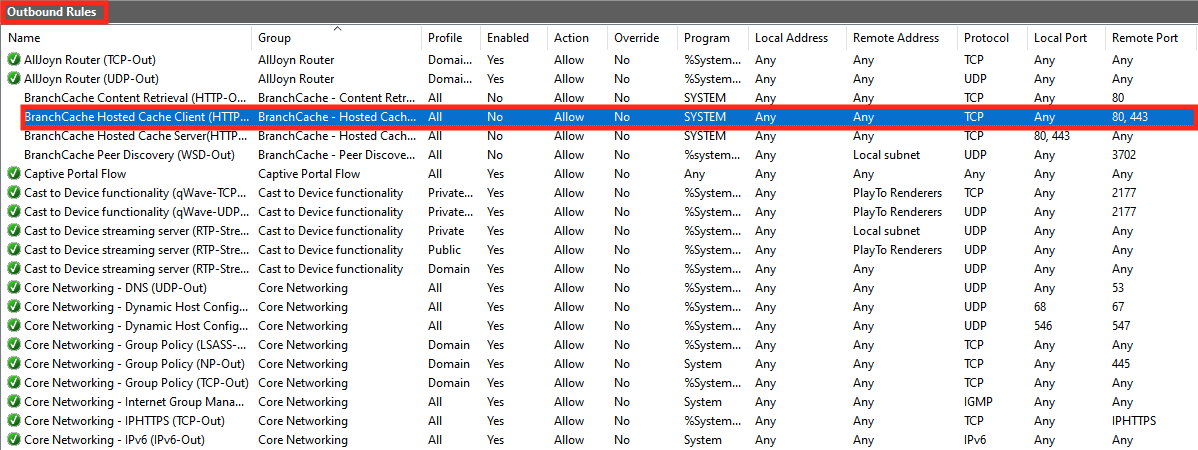
On the console, select the Outbound Rules option from the tree.
-
On the Outbound Rules table, select the rule that relates to the connectivity to Remote Port - 443. Check if the Enabled status is Yes.

-
If the Enabled status of the rule is No, open the context menu for it and select Enable Rule from the pop-up menu.

Enabling Linux Firewall for TCP port 443 connectivity
-
Enter this command to add the required Firewall rule:
sudo iptables -A OUTPUT -p tcp --dport 443 -j ACCEPT -
To verify the creation of the Firewall rule, enter this command:
sudo iptables -LExpected output:
Chain INPUT (policy ACCEPT)
target     prot opt source               destination
Chain FORWARD (policy ACCEPT)
target     prot opt source               destination
Chain OUTPUT (policy ACCEPT)
target     prot opt source               destination
ACCEPT     tcp  --  anywhere             anywhere             tcp dpt:443
