Data encryption
Data encryption refers to protecting data while in transit and at rest. You can protect your data by using Amazon S3-managed keys or KMS keys at rest, alongside standard Transport Layer Security (TLS) while in transit.
Encryption at rest
Amazon Transcribe uses the default Amazon S3 key (SSE-S3) for server-side encryption of transcripts placed in your Amazon S3 bucket.
When you use the StartTranscriptionJob
operation, you can specify your own KMS key to encrypt the output from a transcription
job.
When you create or update custom vocabularies, custom vocabulary filters, or custom language models, you can specify a customer-managed KMS key to encrypt the associated resource artifacts at rest. If you do not provide a KMS key, Amazon Transcribe encrypts these artifacts using an AWS-owned key. For more information about encrypting resource artifacts with a customer-managed key, see Encrypting resource artifacts with a customer-managed key.
Amazon Transcribe uses an Amazon EBS volume encrypted with the default key.
Encryption in transit
Amazon Transcribe uses TLS 1.2 with AWS certificates to encrypt data in transit. This includes streaming transcriptions.
Key management
Amazon Transcribe works with KMS keys to provide enhanced encryption for your
data. With Amazon S3, you can encrypt your input media when creating a transcription job.
Integration with AWS KMS allows encryption of the output from a StartTranscriptionJob
request.
If you don't specify a KMS key, the output of the transcription job is encrypted with the default Amazon S3 key (SSE-S3).
For more information on AWS KMS, see the AWS Key Management Service Developer Guide.
To encrypt the output of your transcription job, you can choose between using a KMS key for the AWS account that is making the request, or a KMS key from another AWS account.
If you don't specify a KMS key, the output of the transcription job is encrypted with the default Amazon S3 key (SSE-S3).
To enable output encryption:
-
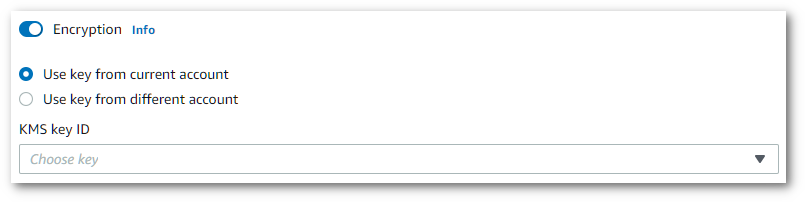
Under Output data choose Encryption.
-
Choose whether the KMS key is from the AWS account you're currently using or from a different AWS account. If you want to use a key from the current AWS account, choose the key from KMS key ID. If you're using a key from a different AWS account, you must enter the key's ARN. To use a key from a different AWS account, the caller must have
kms:Encryptpermissions for the KMS key. Refer to Creating a key policy for more information.
To use output encryption with the API, you must specify your KMS key using the
OutputEncryptionKMSKeyId parameter of the StartCallAnalyticsJob,
StartMedicalTranscriptionJob,
or StartTranscriptionJob
operation.
Specify your KMS key using the Amazon Resource Name (ARN) of the key.
KMS key ARNs have the format
arn:.
For example,
partition:kms:region:account-ID:key/key-idarn:aws:kms:us-west-2:111122223333:key/1234abcd-12ab-34cd-56ef-1234567890ab.
Note that the entity making the request must have permission to use the specified KMS key.
Encrypting resource artifacts with a customer-managed key
For additional control over encryption, you can use a customer-managed KMS key to encrypt the artifacts associated with your custom vocabularies, custom vocabulary filters, and custom language models.
Warning
Do not disable or delete a customer-managed KMS key, or revoke the
permissions granted to the data access role, while your resources are in use. If
Amazon Transcribe cannot access the key during a transcription job, the job fails. If
key access is lost during a resource update, the resource can become unusable. To
recover, restore access to the key and call the corresponding Update operation (for
example, UpdateVocabulary, UpdateVocabularyFilter, or
UpdateLanguageModel).
To configure encryption, include the EncryptionConfiguration parameter when calling
the following operations:
The EncryptionConfiguration object contains the following fields:
-
KMSKey(required) – The Amazon Resource Name (ARN) of the KMS key to use for encryption. KMS key ARNs have the formatarn:. For example,partition:kms:region:account-ID:key/key-idarn:aws:kms:us-west-2:111122223333:key/1234abcd-12ab-34cd-56ef-1234567890ab. -
KMSEncryptionContext(optional) – A map of key:value pairs that provide an additional layer of security. For more information, see AWS KMS encryption context.
You must also provide a DataAccessRoleArn that references an IAM role
with permissions to use the specified KMS key. For more information about the
required AWS KMS permissions and an example policy, see
Permissions required for customer-managed key encryption.
Note
You can change the KMS key used to encrypt a resource by calling the
corresponding Update operation with a new EncryptionConfiguration. If you
omit EncryptionConfiguration from an Update request, the resource artifacts
are encrypted with an AWS-owned key.
Note
When a custom vocabulary or custom vocabulary filter is encrypted with a
customer-managed key, the download URI returned by GetVocabulary
or GetVocabularyFilter
points to encrypted data. To decrypt this data, use the
AWS Encryption SDK
with the same KMS key that was used to encrypt the resource. Direct
AWS KMS decryption is not supported. If no customer-managed key was specified,
these URIs return unencrypted data.
AWS KMS encryption context
AWS KMS encryption context is a map of plain text, non-secret key:value pairs. This map represents additional authenticated data, known as encryption context pairs, which provide an added layer of security for your data. Amazon Transcribe requires a symmetric encryption key to encrypt transcription output into a customer-specified Amazon S3 bucket. To learn more, see Asymmetric keys in AWS KMS.
When creating your encryption context pairs, do not include sensitive information. Encryption context is not secret—it's visible in plain text within your CloudTrail logs (so you can use it to identify and categorize your cryptographic operations).
Your encryption context pair can include special characters, such as underscores (_),
dashes (-), slashes (/, \) and colons
(:).
Tip
It can be useful to relate the values in your encryption context pair to the data being encrypted. Although not required, we recommend you use non-sensitive metadata related to your encrypted content, such as file names, header values, or unencrypted database fields.
To use output encryption with the API, set the KMSEncryptionContext parameter in the
StartTranscriptionJob
operation. In order to provide encryption context for the output encryption operation, the
OutputEncryptionKMSKeyId parameter must reference a symmetric KMS key
ID.
You can also specify encryption context when encrypting resource artifacts (custom vocabularies,
custom vocabulary filters, and custom language models) by including the
KMSEncryptionContext field in the EncryptionConfiguration parameter. For
more information about encrypting resource artifacts with a customer-managed key, see Encrypting resource artifacts with a customer-managed key.
You can use AWS KMS condition keys with IAM policies to control access to a symmetric encryption KMS key based on the encryption context that was used in the request for a cryptographic operation. For an example encryption context policy, see AWS KMS encryption context policy.
Using encryption context is optional, but recommended. For more information, see Encryption context.
