本文為英文版的機器翻譯版本,如內容有任何歧義或不一致之處,概以英文版為準。
# 雲端前面的每個角落

所有類都在積極開發中,並且在任何未來版本中都會受到非向後兼容的更改或刪除。這些不受[語義版本](https://semver.org/)模型。這意味著,雖然您可以使用它們,但在升級到此軟件包的較新版本時,您可能需要更新源代碼。
**請注意:** 為了確保功能正確,專案中的 AWS 解決方案建構套件和 AWS CDK 套件必須是相同的版本。
| **語言** | **套件** |
| --- | --- |
|  Python | aws\_solutions\_constructs.aws\_cloudfront\_apigateway |
|  打字稿 | @aws-solutions-constructs/aws-cloudfront-apigateway |
|  Java | software.amazon.awsconstructs.services.cloudfrontapigateway |
## Overview
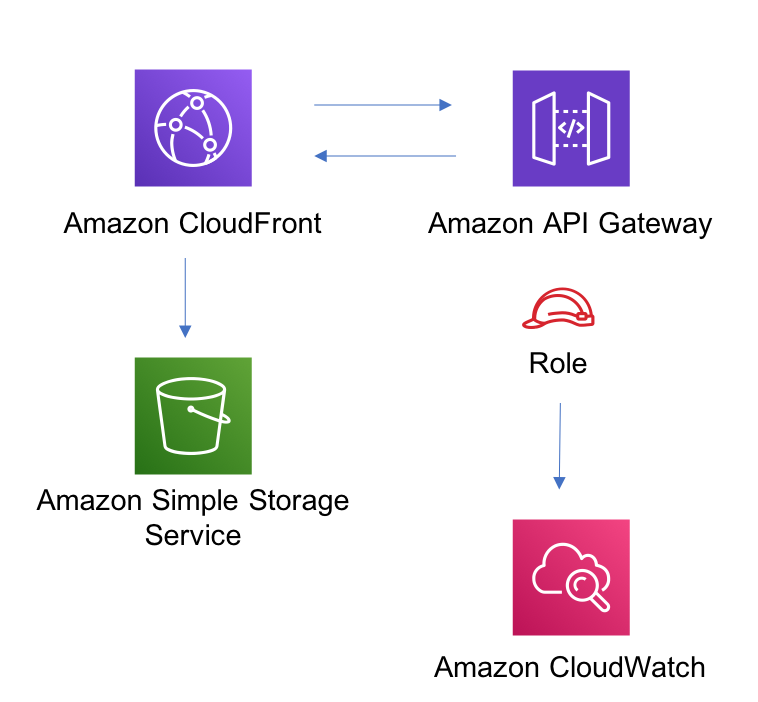
這個 AWS 解決方案構建在 Amazon API Gateway REST API 前面實作了一個 Amazon CloudFront 分發。
下面是 TypeScript 中的最小可部署模式定義:
```
import * as api from '@aws-cdk/aws-apigateway';
import * as lambda from "@aws-cdk/aws-lambda";
import { CloudFrontToApiGateway } from '@aws-solutions-constructs/aws-cloudfront-apigateway';
const lambdaProps: lambda.FunctionProps = {
code: lambda.Code.fromAsset(`${__dirname}/lambda`),
runtime: lambda.Runtime.NODEJS_12_X,
handler: 'index.handler'
};
const lambdafunction = new lambda.Function(this, 'LambdaFunction', lambdaProps);
const apiGatewayProps: api.LambdaRestApiProps = {
handler: lambdafunction,
endpointConfiguration: {
types: [api.EndpointType.REGIONAL]
},
defaultMethodOptions: {
authorizationType: api.AuthorizationType.NONE
}
};
const apiGateway = new api.LambdaRestApi(this, 'LambdaRestApi', apiGatewayProps);
new CloudFrontToApiGateway(this, 'test-cloudfront-apigateway', {
existingApiGatewayObj: apiGateway
});
```
## Initializer
```
new CloudFrontToApiGateway(scope: Construct, id: string, props: CloudFrontToApiGatewayProps);
```
*參數*
+ scope[`Construct`](https://docs.aws.amazon.com/cdk/api/latest/docs/@aws-cdk_core.Construct.html)
+ id`string`
+ 提案[`CloudFrontToApiGatewayProps`](#pattern-construct-props-4)
## 模式建立道具
| **名稱** | **類型** | **描述** |
| --- | --- | --- |
| 現有的阿比格特瓦尤比 | [`api.RestApi`](https://docs.aws.amazon.com/cdk/api/latest/docs/@aws-cdk_aws-apigateway.RestApi.html) | 將使用 CloudFront 前端的區域 API Gateway |
| 雲端發佈道具? | [`cloudfront.DistributionProps`](https://docs.aws.amazon.com/cdk/api/latest/docs/@aws-cdk_aws-cloudfront.DistributionProps.html) | 可選的使用者提供的道具,以覆寫 CloudFront 分發的預設道具。 |
| 插入安全性標頭? | boolean | 可選的用戶提供的道具,用於在 CloudFront 的所有響應中打開/關閉最佳實踐 HTTP 安全標頭的自動注入 |
## 模式性質
| **名稱** | **類型** | **描述** |
| --- | --- | --- |
| ApeGateway | [`api.RestApi`](https://docs.aws.amazon.com/cdk/api/latest/docs/@aws-cdk_aws-apigateway.RestApi.html) | 返回由模式創建的 API Gateway REST API 的實例。 |
| 雲端記錄桶? | [`s3.Bucket`](https://docs.aws.amazon.com/cdk/api/latest/docs/@aws-cdk_aws-s3.Bucket.html) | 傳回 CloudFront 網頁分發模式所建立之記錄儲存貯體的執行個體。 |
| 雲端網絡發佈 | [`cloudfront.CloudFrontWebDistribution`](https://docs.aws.amazon.com/cdk/api/latest/docs/@aws-cdk_aws-cloudfront.CloudFrontWebDistribution.html) | 返回由模式創建的 CloudFront 網絡分發的實例。 |
| 埃德格拉姆針灸版本? | [`lambda.Version`](https://docs.aws.amazon.com/cdk/api/latest/docs/@aws-cdk_aws-lambda.Version.html) | 返回由模式創建的 Lambda 邊緣函數版本的實例。 |
## 預設設定
此模式的開箱即用實現沒有任何覆蓋將設置以下默認值:
### Amazon CloudFront
+ 設定 CloudFront 網路發佈的存取記錄
+ 在 CloudFront 網路發佈的所有回應中啟用自動插入最佳實務 HTTP 安全性標頭
### Amazon API Gateway
+ 用戶提供的 API Gateway 對象按原樣使用
+ 啟用 X-Ray 追蹤
## Architecture
## GitHub
