Erste Schritte
Sie können den Harness über die AgentCore CLI oder direkt mit AWS SDKs wie boto3 verwenden. Die CLI ist für die meisten Entwickler der schnellste Weg. SDKs sind für die programmatische Verwendung in Ihrer eigenen Anwendung vorgesehen.
Voraussetzungen
Erste Schritte
Beispiel
- AWS CLI/boto3
-
Erstellen Sie den Kabelbaum mit einem Namen und einer Ausführungsrolle:
aws bedrock-agentcore-control create-harness \
  --harness-name "MyHarness" \
  --execution-role-arn "arn:aws:iam::123456789012:role/MyHarnessRole"
Umfrage get-harness bis"status": "READY". Beachten Sie die arn in der Antwort.
aws bedrock-agentcore-control get-harness \
  --harness-id "MyHarness-XyZ123"
Rufen Sie von Python aus auf. Wenn Sie kein Modell angeben, ist der Kabelbaum standardmäßig auf Anthropic Claude Sonnet 4.6 auf Amazon Bedrock eingestellt:
import boto3

client = boto3.client("bedrock-agentcore", region_name="us-west-2")

response = client.invoke_harness(
    harnessArn="arn:aws:bedrock-agentcore:us-west-2:123456789012:harness/MyHarness-XyZ123",  # Replace with your harness ARN
    runtimeSessionId="1234abcd-12ab-34cd-56ef-1234567890ab",
    messages=[{
        "role": "user",
        "content": [{"text": "Research three tropical vacation options under $3k."}]
    }],
)

for event in response["stream"]:
    if "contentBlockDelta" in event:
        delta = event["contentBlockDelta"].get("delta", {})
        if "text" in delta:
            print(delta["text"], end="", flush=True)
    elif "runtimeClientError" in event:
        print(f"\nError: {event['runtimeClientError']['message']}")
- AgentCore CLI
-
Installieren Sie die AgentCore CLI:
npm install -g @aws/agentcore
Erstellen Sie ein Harness-Projekt ohne Interaktion mit Flags:
agentcore create --name myresearchagent --model-provider bedrock
Bereitstellen und aufrufen:
agentcore deploy
agentcore invoke --harness myresearchagent \
  --session-id "$(uuidgen)" \
  "Research three tropical vacation options under $3k, within five hours of NYC."
Die Antwort wird zu Ihrem Terminal gestreamt. Verwenden Sie dasselbe --session-id für mehrere Aufrufe wieder, um die Konversation in derselben Umgebung fortzusetzen.
Um einem vorhandenen Projekt weitere Kabelbäume hinzuzufügen, verwenden Sie. agentcore add harness Um ein eigenständiges Python-Aufrufskript zu generieren, fügen Sie hinzu--with-invoke-script.
Nützliche Flaggen:
-
--no-browser(-b) - verwende das Terminal TUI anstelle des Browser-Inspectors
-
--logs(-l) — läuft im nicht-interaktiven Modus mit Protokollen auf Standardausgabe
-
--port <port>(-p) - legt den Dev-Server-Port fest (Standard 8080)
-
--no-traces- Deaktiviert die lokale Erfassung von OTEL-Traces
- Interactive
-
Installieren Sie die AgentCore CLI:
npm install -g @aws/agentcore
agentcore createOhne Flags ausführen, um den interaktiven Assistenten zu starten:
agentcore create
-
Geben Sie Ihren Projektnamen ein:
-
Wählen Sie Harness als Projekttyp aus:
-
Wählen Sie Ihren Modellanbieter:
-
Wählen Sie Ihre Umgebung (Standard, Container-URI oder Dockerfile):
-
Speicher konfigurieren:
-
Konfigurieren Sie optional erweiterte Einstellungen (Tools, Authentifizierung, Netzwerk, Lebenszyklus, Grenzwerte, Kürzung, Sitzungsspeicher):
-
Überprüfen Sie Ihre Konfiguration und bestätigen Sie:
Nach der Bestätigung erstellt der Assistent das Gerüst für Ihr Projekt. Bereitstellen mitagentcore deploy, dann aufrufen mit. agentcore invoke
Überprüfen Sie den Projektstatus jederzeit mitagentcore status:
Wenn Sie den Harness in Ihrer lokalen Umgebung testen möchten, können Sie den Dev-Server ausführen:
agentcore dev
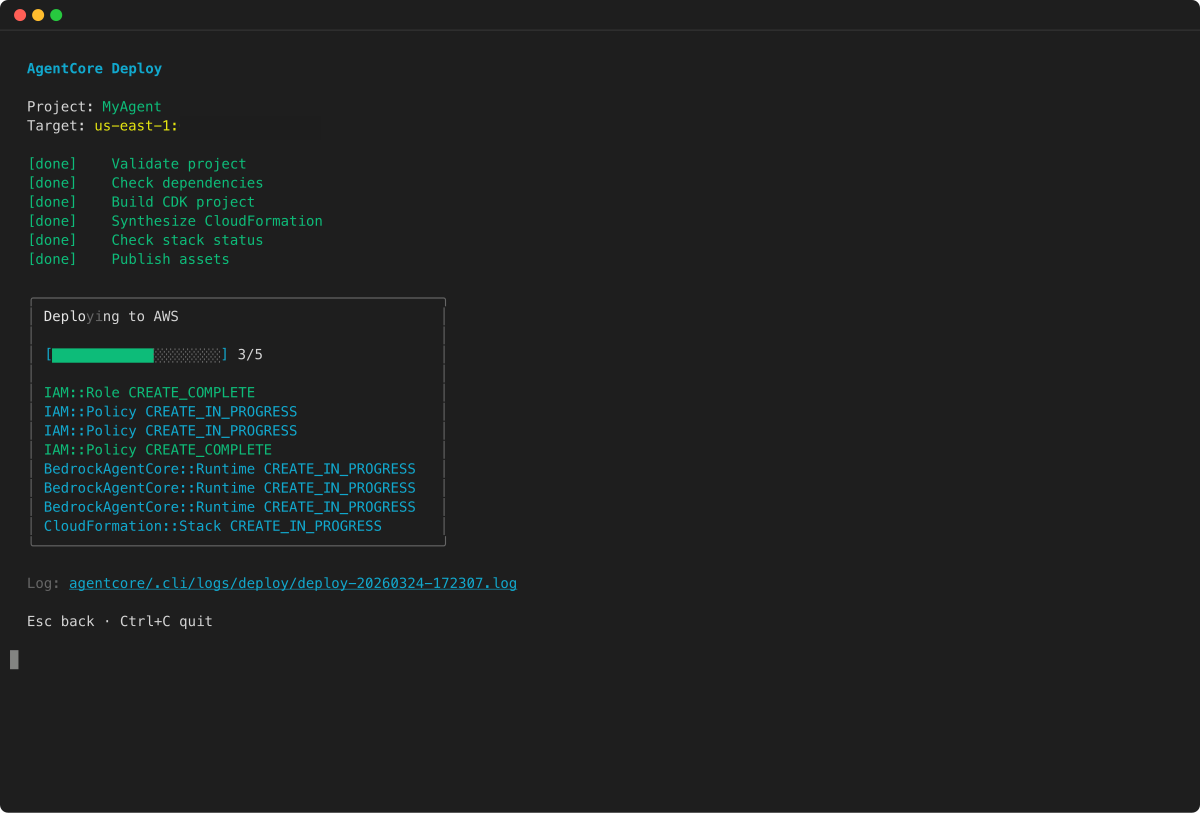
Bei der Ausführung agentcore dev stellt die CLI zunächst Ihre Harness-Ressourcen bereit AWS und erstellt dabei die IAM-Rolle, den Harness und alle in Ihrem Projekt konfigurierten Speicher- oder Anmeldeinformationen:
Sobald die Bereitstellung abgeschlossen ist, wird ein lokaler Server gestartet und der Agenteninspektor in Ihrem Browser geöffnet, in dem Sie mit dem Harness chatten, Traces überprüfen und Projektressourcen durchsuchen können:
Erweitern Sie die Harness-Einstellungen, um die Kabelbaumkonfiguration für die aktuelle Sitzung anzuzeigen und zu überschreiben:
Das ist alles, was Sie brauchen, um einen Gurt zum Laufen zu bringen. In den folgenden Abschnitten wird alles behandelt, was Sie konfigurieren können.
Das runtimeSessionId muss mindestens 33 Zeichen lang sein. Verwenden Sie eine UUID oder einen ähnlichen Bezeichner. Verwenden Sie dieselbe Sitzungs-ID für mehrere Aufrufe wieder, um eine Konversation in derselben Umgebung fortzusetzen.
API-Dokumentation
Weitere Informationen finden Sie in der API-Referenz:
InvokeHarnessgibt einen Stream von Ereignissen zurück. Die wichtigsten Ereignistypen sind:
-
messageStart- Beginn einer neuen Nachricht (beinhaltetrole)
-
contentBlockStart- Beginn eines Inhaltsblocks (Text,toolUse, odertoolResult)
-
contentBlockDelta- inkrementeller Inhalt (text, toolUse Eingabe,reasoningContent)
-
contentBlockStop- Ende eines Inhaltsblocks
-
messageStop- Ende der Nachricht (beinhaltetstopReason)
-
metadata- Kennzahlen zur Token-Nutzung und Latenz
-
runtimeClientError- Fehler bei der Ausführung
Die Eingabe messageStop gibt stopReason an, warum der Agent gestoppt wurde:
-
end_turn- der Agent wurde normal beendet
-
tool_use- Der Agent ruft eine Inline-Funktion auf und wartet auf ein clientseitiges Ergebnis
-
max_tokens- Das Token-Limit pro Runde des Modells wurde erreicht
-
max_iterations_exceeded- das maxIterations Limit wurde erreicht
-
timeout_exceeded- das timeoutSeconds Limit wurde erreicht
-
max_output_tokens_exceeded- das maxTokens Budget war erschöpft